Ohjelman tiedot:
| Nimi: | Fraps | | Versio: | 3.5.99 | | Lisenssi: | Shareware | | Järjestelmä: |  | | Päivitetty: | 03.03.2013 | | Kotisivu: | FRAPS |
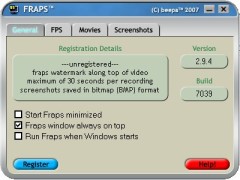
FRAPS on ohjelma jolla voi kaapata videokuvaa DirectX tai OpenGL rajapintaa käyttävistä peleistä tai ohjelmista.
Kaappaus tapahtuu suoraan näytönohjaimen grafiikkapuskurista, joten se on nopeaa ja mahdollista suurillakin resoluutioilla reaaliajassa. Jos käytössä on nVidian 3D Vision, on mahdollista kaapata stereoskooppista kuvaa.
Lataa ohjelman kotisivulta:  Muutosloki :
Fraps 3.5.9 - 30th August, 2012
- Fixed crash when initiating loop recording
- Fixed periodic stutter for some users during loop recording
Fraps 3.5.8 - 22nd August, 2012
- Fixed intermittent crash recording from OpenGL games
- Fixed crash when unable to access sound device
- Fixed minor memory leak with Win7/Vista sound recording
- Fixed crash encountered by some users when ending a recording
Fraps 3.5.7 - 14th August, 2012
- Fixed audio sync in long recordings for Windows XP users
- Fixed problem taking screenshots from DWM even with counter on screen
- Fixed 64-bit DirectX 11 games always being recorded in lossless RGB
- Fixed corruption in video when audio source set to 11.25kHz
- Other minor bug fixes
Fraps 3.5.6 - 21st July, 2012
- Fixed microphone drifting out of sync in long recordings under Windows 7 & Vista
- Fixed clipping with audio sources greater than 8 channels
- Fixed audio from mono USB devices only appearing in left channel
- Reduced latency of capture from external inputs
Fraps 3.5.5 - 12th June, 2012
- Fixed black borders captured around GameMaker based games
- Fixed crash in D3D10/11 video recording with 64-bit applications
- Fixed scrambled colors saved with some 10-bit color modes
Fraps 3.5.4 - 30th May, 2012
- Improved capture speed for D3D8 games
- Fixed Max Payne 1 not recording when AA enabled
- Fixed error when initializing DirectX on Windows 7
Fraps 3.5.3 - 27th May, 2012
- Fixed micro-stutter in recorded video after temporary framerate drop
- Fixed missing video frames in some games after rendering paused
- Fixed bug causing error message on startup for some users
Fraps 3.5.2 - 20th May 2012
- Fixed missing audio at end of long recordings
- Fixed error preventing movie playback in Windows Media Player
- Fixed screen freezing when starting video capture in Minecraft & other OpenGL games
- Fixed crash during video mode switch in DosBox
Fraps 3.5.1 - 18th May 2012
- Added support for exFAT drives writing larger than 4 Gigabytes
- Fixed crash when large custom resolutions used in game
Fraps 3.5.0 - 26th April 2012
- Support for large AVI movie files (above 4 Gigabytes) on NTFS drives
- Added option to split AVIs at 4 Gigabytes for legacy AVI 1.0 support
- Fixed loop recording using large amounts of disk space for short clips
- Fixed benchmark logs not being saved if game was quit before benchmark ended
- Fixed View folder not opening window on some machines
- NEW MINIMUM SYSTEM REQUIREMENTS: CPU with SSE2 required (Pentium 4 & above)
- Windows 2000 is no longer supported (Windows XP & above)
Fraps 3.4.7 - 22nd October 2011
- Fixed recording rate being locked to a low multiple when Vsync enabled
- Fixed unlocked recording speed after temporary slowdowns
- Fixed Alt key interference with VMware/remote desktop applications
Fraps 3.4.6 - 31st July 2011
- Fixed overlay color in Fear 3
- Fixed detection of IL2: Cliffs of Dover and Bloodline Champions
- Fixed counter appearing in Thunderbird and Pale Moon applications
- Other minor bug fixes
Fraps 3.4.5 - 28th May 2011
- Fixed some videos being recorded with scrambled colors
Fraps 3.4.4 - 26th May 2011
- Increased performance capturing Vista/Windows 7 aero desktop (DWM)
- Reduced memory footprint of Fraps process
- Fixed Fraps crash while idling on desktop
- Fixed gem glowing while recording The Dark Mod
- Fixed hotkeys not responding when simulated from autohotkey/macro apps
- Fixed graphic corruption in some OpenGL titles
Fraps 3.4.3 - 12th May 2011
- Improved DirectDraw capture speed
- Fixed recording crash on single CPU systems
- Fixed invalid colors/crashing recording from 16-bit color games
- Fixed corrupt/oversized AVIs being written at high resolutions
- Fixed Dirt not loading with Fraps running
- Other minor bug fixes and optimizations...
Fraps 3.4.2 - 14th Apr 2011
- Improved OpenGL capture speed
- Fixed freeze when clicking on Minimize button
- Fixed GL state not being restored properly
- Fixed blank video showing in some AVIs
Fraps 3.4.1 - 2nd Apr 2011
- Fixed crash when starting Fraps for some users
- Fixed hotkeys not being detected when modifier keys held
- Fixed keys getting stuck when used by both the game and Fraps
Fraps 3.4.0 - 29th Mar 2011
- Added configurable buffer size for loop recording mode
- Increased video capture performance at high resolutions
- Fixed slow recording of Minecraft at default window size
- Fixed benchmark crashing when configured to stop automatically after 1 second
Fraps 3.3.3 - 15th Mar 2011
- Fixed mouse not responding in Ragnarok and some applications
Fraps 3.3.2 - 9th Mar 2011
- Added detection of mouse buttons (Mouse3, Mouse4 & Mouse5 can be used as hotkeys)
- Added support for all Ctrl, Shift & Alt combinations for use with Fraps hotkeys
Fraps 3.3.1 - 1st Mar 2011
- Fixed Fraps not detecting Agrar Simulator 2011 and some D3D9Ex applications
- Fixed wrong capture dimensions for Fallout 3/New Vegas & Milkdrop
- Fixed counter showing over frames in IE9 beta
- Fixed stereoscopic capture not working in half-size mode for some games
- Additional minor bug fixes
Fraps 3.3.0 - 22nd Feb 2011
- Full support for Windows 7 SP1
- Added option to only capture external sound input while hotkey pushed (Vista/Win7)
- Fixed stereoscopic 3D capture not working for D3D9 games
- Fixed counter not appearing in Dungeons
3.2.9 - 10th Feb 2011
- Fixed crash if recording to drive with less than 4 gigabytes free
- Improved sound capture engine for those suffering sync issues
- Fixed 3D browser apps not being correctly monitored in Firefox 3
- Fixed detection of UDK viewport sizes
3.2.8 - 3rd Feb 2011
- Greatly reduced CPU usage while recording on most configurations
- Fixed black areas in captures from Flight Simulator (FS9/FSX)
- Fixed counter not showing in correct position for some windowed applications
- Fixed crash when recording DWM at 1366x768 on 64-bit versions of Windows
- Fixed counter appearing in Google Talk
3.2.7 - 19th Jan 2011
- Fixed large pause between split AVI segments
- Fixed stuttering when using loop recording on Vista/Win7
- Other minor bug fixes
3.2.6 - 24th Dec 2010
- Fixed Fraps not able to initialize DirectX on startup for some people
- Fixed crash while recording that could cause video to be written incompletely
- Fixed rare bug causing graphic corruption of individual frames in recorded movies
- Fixed crash on Windows 2000 machines
3.2.5 - 2nd Dec 2010
- Fixed keys sticking/duplicated with Fraps loaded
- Fixed Fraps not capturing in half-size mode for some users
3.2.4 - 28th Nov 2010
- Added support for D3D10 & D3D11 stereoscopic 3D Vision capture
- Fixed counter appearing on Windows Live 2011 apps
- Fixed inverted colors in video captured from some DX10 games
- Fixed DWM capture jumping between multiple monitors on Windows 7
- Fixed flickering counter in some OpenGL applications
- Fixed mouse offset in 3D browser apps
- Fixed FRAPS.EXE not appearing signed on some Windows 7 installations
- Fixed systray icon not turning pink in loop recording mode.
- Fixed startup crash on 24-core CPU systems
- Added support for Win7 SP1 RC
- Other minor bug/stability fixes
3.2.3 - 14th Jun 2010
- Added support for full-size video capture above 2560x1600
- Fixed crash when loading Fraps under WinXP with 6-core CPU
- Fixed crash when enabling monitor DWM option on some configurations
- Fixed Fraps altering error flag on calls to GL SwapBuffers
- Fixed sound input switching at startup on XP systems
- Fixed counter appearing in VS2010
3.2.2 - 31st Mar 2010
- Fixed trouble opening movies with VLC, Avidemux, AVI synth, Virtualdub and some other applications
- Fixed problem capturing stereoscopic movies at 1920x1080 and 1920x1200
- Fixed loop recordings sometimes becoming corrupted
3.2.1 - 29th Mar 2010
- Fixed screen capture of large resolutions (ATI Eyefinity)
- Fixed counter disappearing in some games when switching resolution
- Improved recording speed on SLI configurations
- Other minor bug/crash fixes
3.2.0 - 26th Mar 2010
- Added loop recording for registered users. Press and hold video capture hotkey to start 30 second buffer
- Added option to disable stereoscopic capture when running with NVIDIA 3DVision
- Major optimizations for recording from D3D10 & D3D11 games
3.1.2 - 4th Mar 2010
- Fixed STALKER: Call of Pripyat not loading with Fraps running
- Fixed slow recording speeds for some users in Battlefield: Bad Company 2
- Fixed Guild Wars crashing when moving between zones
- Fixed videos being recorded at double width on some nvidia configurations
- Fixed colors being inverted in video captured from some DX10 games
- Fixed multiple FRAPS32.DLL crashes
3.1.1 - 11th Feb 2010
- Fixed detection of loading screens when recording with unlocked framerate
- Added product information to installer
3.1.0 - 8th Feb 2010
- Added option to capture videos with framerate locked or unlocked
- Fixed startup crash for some Intel i5/i7 configurations under Windows 7
- Minimum recording speed is now 1 fps to allow for time lapse recording
- Fixed vista desktop recording not capturing mouse cursor
- Fixed sound length for Vista/Win7 recordings
- Added large address support to 32-bit codec
- Fixed window starting off screen on some multi-monitor systems
3.0.3 - 21st Nov 2009
- Fixed installer not displaying correctly for some users under Win7
3.0.2 - 18th Nov 2009
- Fixed inability to put machine to sleep with Fraps running
- Fixed bug preventing people from updating the benchmark timeout value
- Fixed problem restoring Fraps window to previous position upon startup
- Fixed AUDIODG.EXE consuming large amounts of CPU for some users
3.0.1 - 8th Nov 2009
- Added minimize to systray option for Win7 users
- Fixed video capture frame rate defaulting to 30 fps when Fraps loads
3.0.0 - 5th Nov 2009
- DirectX 11 support
- Compatible with Windows 7 final (RTM) and RC1 versions
- Stereoscopic 3D Vision video capture up to 1920x1200 for D3D9 games
- Force lossless RGB option to always capture video in pure form
- Ability to mix both game sound and external input such as microphone (Vista/Win7 only)
2.9.99 - 16th Oct 2009
- Fixed flickering video capture in Operation Flashpoint: Dragon Rising
- Fixed 30-bit color captures in Eve Online
- Fixed mouse cursor not being recorded in Conquer Online
- Other minor bug fixes
2.9.9 - 29th Aug 2009
- Fixed missing audio in Adobe Premiere and Sony Vegas
- Fixed benchmarks not being written to benchmark folder
- Fixed loading crash when attempting to start Fraps
- Fixed stalling/stuttering after first 4 gig AVI segment
- Fixed mouse cursor image/transparency corruption
- Fixed mouse cursor offset in some applications
- Fixed crash when recording above 1920x1200 for some users
- Fixed crash after stopping video capture in Windows 2000
- Fixed crash in some DirectX10 applications
- Fixed random windows crashes with fraps.dll
- Fixed missing systray icon if explorer restarts
- Fixed frapsvid.dll and frapsv64.dll crashes when importing/playing video
- Fixed Run Fraps when Windows starts option
- Fixed Starcraft stalling during video capture
- Fixed limited CPU affinity of main Fraps process
- Fixed yellow corruption displayed in Plants vs Zombies
- Fixed capture speed of many older DDRAW games
2.9.8 - 3rd Jan 2009
- Fixed crash on installation for some users
- Fixed Fraps not working with Combat Arms
- Fixed counter not switching properly between multiple active 3D applications
- Fixed Fraps not detecting windowed games while monitoring DWM
- Systray icon now turns red while recording
- Minor optimizations and bug fixes
- Reduced memory footprint of 64-bit version of Fraps
2.9.7 - 19th Dec 2008
- Fixed 64-bit applications crashing soon after loading
- Fixed low quality sound recording with Left 4 Dead under Windows XP
- Fixed graphic corruption in X-Plane (and other OpenGL titles)
- Fixed crash when recording a DirectX 9 game and changing resolution
- Fixed Fraps not detecting games after being run at Windows startup
- Fixed hotkeys not responding when Alt held down
- Fixed monitoring of Vista DWM after a full-screen application has exited
- Fixed Fluidmark displaying a blank screen with Fraps loaded
- Fixed FS9 crashing when menu activated while recording
- Fixed DWMAPI error on some Windows XP installs
- Improved recording speed of DirectX9 games in Vista SP1 and SP2 beta
- Added warning if no sound recording device found under Windows 2000 or XP
|
Lisää -><- Piilota
joku vaan
31.08.2010 17:06 |


 MiikaH:n Sivut a.k.a. MiikaHweb | 2003-2021