Ohjelman tiedot:
| Nimi: | Paint.NET | | Versio: | 3.5.10 | | Lisenssi: | Open Source (MIT) | | Järjestelmä: |  | | Päivitetty: | 24.10.2011 | | Kotisivu: | Paint.NET |
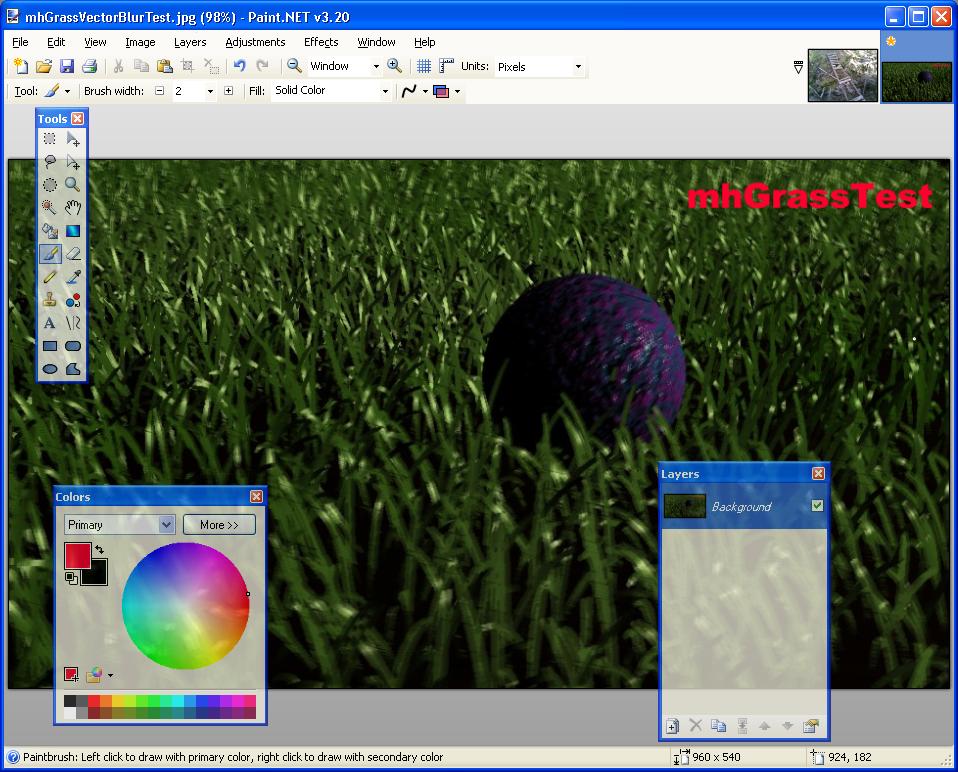
Paint.NET on helppokäyttöinen kuvankäsittelyohjelma. Paint.NET tukee tasoja ja kuvien läpinäkyvttä. Mukana on myös liuta työkaluja kuvan laadun, väritasapainon ja kontrastin parantamiseksi. Ohjelmasta löytyy myös kattava valikoima suodattimia aina sumennustehosteista ääriviivaversioon. Ohjelmaan voi myös ladata liisää tehosteita liitännäisinä. Paint.NET näyttää kuvan tallennusvaiheessa esikatselukuvan tallenteen lopullisesta laadusta ja tiedostokoosta, joten pakkaussuhteen määrittäminen on helppoa. Tästä linkistä voit ladata ohjelman suomenkielisen käännöksen.
Lataa ohjelma:  Muutosloki :
Paint.NET v3.5.10 - released on October 9th, 2011
This update fixes some broken shortcut keys for the View -> Actual Size command.
Fixed: Ctrl+Shift+A now works again as a shortcut for View -> Actual Size (broken in 3.5.9)
Fixed: Ctrl+0 still works for View -> Actual Size even if 10 or more images are open (broken in 3.5.9, it would switch to the 10th image).
Paint.NET v3.5.9 - released on October 1st, 2011
This update improves the "Auto-Detect" bit-depth feature, and fixes a few small issues.
Improved: The "Auto-detect" bit-depth setting for PNG, BMP, and TGA now also determines which bit-depth to use based on which one produces the smallest file size, as well as which ones can save the image without losing fidelity.
Improved: You can now use Ctrl+0 as a shortcut key for View -> Actual Size, in addition to Ctrl+Shift+A and Ctrl+Alt+0.
Fixed: Some text in the DirectDraw Surface (DDS) Save Configuration UI was not being loaded.
Fixed: Some DirectDraw Surface (DDS) files authored with other software (e.g. Unreal 2004) could not be loaded.
Fixed: In some rare circumstances, clicking on the Save button in the toolbar would crash.
Fixed: The Korean translation has been added back in, with the help of Bing machine translation to cover the few remaining strings that were untranslated.
Paint.NET v3.5.8 - March 5th, 2011
This update fixes some issues with the fault-tolerant save feature introduced in 3.5.7.
Fixed: Saving to a folder that has been moved or renamed will display an error instead of crashing (regression from 3.5.6)
Fixed: Saving to a Sharepoint site will now work (regression from 3.5.6)
Fixed: Saving to a file that is marked as read only will now give an error instead of crashing (regression from 3.5.6)
Fixed: General reliability and correctness improvements to fault-tolerant saving
Paint.NET v3.5.7 - February 20th, 2011:
* Saving an image is now fault-tolerant. If there is an error or crash while saving, the original file will be left alone.
* Worked around a bug in some plugins that are incorrectly using the built-in Gaussian Blur effect. For example, Sharpen+. Now they won't crash.
* Fixed a bug with Edit->Paste into New Image, where the new image would be 1 pixel too wide or tall, as reported at http://forums.getpaint.net/index.php?/topic/20969-paste-problem/
* Fixed a bug with the Rectangle Select tool and Fixed Ratio selection, which would be off by 1 pixel, as reported at http://forums.getpaint.net/index.php?/topic/20820-croppig-by-fixed-ratio-is-inexact
* When pasting an image from Paint.NET into Paint.NET, it will be a little smarter about where it puts the image. Previously, if the location wasn't within the viewport, it would be placed at the top-left corner of the viewport. Now it will find the nearest point along the edge of the viewport to place the image.
* The EXIF rotation ("orientation") metadata is now discarded when opening an image, which was causing aggravation with images that could then never be reoriented correctly using Image->Rotate
* The EXIF metadata for JPEG thumbnail data are now correctly discarded.
* Fixed a handful of memory leaks.
* Fixed a typo in the Italian translation. In the setup wizard it was referring to "Pain.NET" (woops)
Paint.NET v3.5.6 - November 18th, 2010:
* When pasting an image, Paint.NET will be smarter about ensuring it is placed within the area that has been scrolled/zoomed to.
* Improved the performance and quality of the Curves and Hue/Saturation adjustments.
* Some minor improvements to memory usage, which should help out a few scenarios on 32-bit systems.
* Fixed: If a JPEG was loaded that had an embedded ICC profile, and was then saved as an 8-bit or 24-bit PNG, then the resulting file would be corrupt (32-bit PNG worked fine though).
* Fixed: 16-bit TGAs no longer load with the red and blue channels swapped.
* Fixed: Copy-paste from a Remote Desktop session will no longer be 'shifted' by 3 pixels.
* Fixed: Copy-paste from Internet Explorer, Firefox, or Chrome should preserve alpha/transparency.
* Fixed: Copying from Paint.NET and pasting into Windows Live Writer should now work.
* Fixed: Taking a full-screen screenshot with Print Screen on a multimonitor system, where those monitors don't form a simple rectangle, will now fill the 'gap area' with transparent instead of black. (Example: two monitors of the same size, one of which is rotated by 90 degrees)
* Fixed: If Paint.NET is opened without specifying an image to open, and then the default image is modified and saved, then Paint.NET will no longer close it upon opening another one. This was causing data loss if that default image had layers, and was then saved in a format that did not support layers (anything other than .PDN).
* Fixed: Some systems were showing 'red X' thumbnails for .PDN files in Windows Explorer, instead of the real thumbnail.
* Fixed: The EXIF "Creation Software" saved along with images is no longer localized. This prevents certain languages from seeing "Paint.NET ????? v3.5.6" in the image properties (metadata)....
Paint.NET v3.5.5 - released on April 25th, 2010:
* Fixed the bug where saving as 8-bit PNG/GIF/BMP wasn't always working, usually with larger images.
* Improved the performance of the Gaussian Blur effect by 30-40%.
* Improved the performance of all the layer blending modes by 15-30%.
* Improved the performance of zooming with the mouse wheel on dual-core Intel Atom systems.
* Updated to support .NET 4.0 if no other version of .NET is installed.
* Reduced download size from 4.8MB down to 3.5MB.
* Fixed a small error in the Chinese translation.
Changes and fixes since v3.5.3:
* Improved performance of the Image->Flatten command by making it multithreaded.
* Fixed the File->Save As dialog not opening to the correct folder.
* Fixed a crash with certain plugins and their use of the File Open dialog.
* Fixed a very rare crash with the toolbar's font list.
Changes and fixes in v3.5.3:
* Fixed DirectDraw Surface (.dds) file format support for CPUs which do not have SSE2 (Pentium III, Athlon XP)
* Fixed an issue with the File->Save dialog related to file type plugins that were only written for opening (importing).
* Fixed some crashes which were supposed to be "out of memory" errors.
* Fixed a race condition with the New Image, Canvas Size, and Resize dialogs. If you typed extremely fast you could cause a crash by typing a negative number and immediately pressing OK or Enter.
* Fixed a File->Save dialog issue in Win7/Vista where it could ask you about overwriting the wrong file.
Changes and fixes in v3.5.2:
* All font face variants (e.g., Arial vs. Arial Narrow) are now available with the Text tool in Win7/Vista with DirectWrite.
* Bitmap font types (e.g. Courier, Terminal, Fixedsys) are now available with the Text tool in Win7/Vista.
* Fixed some bad text kerning with the Text tool at small font sizes when antialiasing was turned off.
* For the Image->Resize function, the quality, correctness, and performance of Bilinear and Bicubic sampling modes have been improved. Super Sampling also has some performance improvement.
* Improved the rendering quality for the Hue/Saturation adjustment. Also made a new icon for it.
* Fixed many subtle rendering issues with the Move Selected Pixels tool. These were apparent when flipping or rotating a selected area.
* Fixed: The Line/Curve tool was applying pixel snapping to the curve nodes, which caused lines to "bend" when using the Shift key to constrain the angle.
* Fixed some extraneous CPU usage related to unnecessary or redundant thumbnail updates.
* Fixed a few dialogs that looked wrong with Aero glass with Remote Desktop or Virtual PC.
* Fixed a nasty memory leak with Flatten followed by Undo.
* Fixed some issues related to effects that took awhile to cancel. As it turns out, drag-and-drop was enabled at this time, which easily lead to crashes or hangs.
* Some Win7 systems could not detect that .NET 3.5 SP1 was installed, even though it was. A fallback detection function has been added.
* For plugin authors, the Effect class now has a pollable IsCancelRequested property. This can be used to improve responsiveness for expensive OnSetRenderInfo() implementations which are otherwise non-interruptible.
* For plugin authors, the Surface.FitSurface() method is now optimized to use multiple threads, which improves performance.
Changes/fixes in v3.5.1:
* New: For Windows 7, added taskbar progress reporting for long running operations (effects, adjustments, Image->Resize, save, install)
* Made some corrections to the French translation
* Running setup with /auto will no longer launch Paint.NET when it’s done
* Fixed an issue where Paste into New Image would refuse an image on the clipboard, even if regular Paste would take it
* Fixed a race condition with Edit->Paste and Image->Resize whereby it would take up 100% CPU and take between 1 minute to 1 hour to finish
* Fixed an issues with Copy/Paste where it would leave an extra line of transparent pixels on the left, top, right, and/or bottom edges
* Fixed lag with the paintbrush tool that was being seen on some systems
* Fixed some issues with the paintbrush and eraser tool being misaligned when zoomed in
* Fixed a crash that would happen at (seemingly) random times, such as after drawing with the paintbrush tool, on some systems
* Fixed a minor and obscure rendering glitch with the Move Selected Pixels tool
* Fixed an issue with glass over Remote Desktop or Windows 7 Virtual PC
* Fixed a minor glitch whereby the "Unsaved Changes" confirmation dialog could never finish rendering the image thumbnail if one of the Move tools was active
Paint.NET v3.5:
* New: Refreshed user interface with new icons and visual styling. On Windows 7 and Vista, it is enhanced for Aero and "glass".
* New effect: Blurs -> Surface Blur, by Ed Harvey
* New effect: Distort -> Dents, by Ed Harvey
* New effect: Distort -> Crystalize, by Ed Harvey
* New: Russian translation.
* Performance and memory usage have been extensively optimized throughout the entire program.
* .NET Framework 3.5 SP1 is now required, which has many built-in performance improvements.
* Disk space usage has been reduced by about 12MB by using NTFS compression on installation files related to staging (.MSI) and diagnostics (.PDB).
* Compression for .PDN images has been improved.
* Effect dialog responsiveness has been improved.
* Images open much faster, especially on single CPU systems.
* Startup performance on most systems will be better by about 20%.
* Memory usage has been reduced when more than one image is open.
* Rendering quality has been greatly improved when zoomed in.
* The selection outline is no longer animated. Instead of "dancing ants", a context-sensitive "XOR" stipple pattern is drawn. This has allowed for improved performance and lowered CPU consumption (and longer battery life).
* The font manager for the Text tool has been completely rewritten, which fixes many problems seen with crashes and missing fonts.
* On Windows XP, the Text tool has improved reliability and font selection (it uses GDI instead of GDI+).
* On Windows 7, the Text tool will use DirectWrite (instead of GDI) which gives better performance and greatly improved quality. On Windows Vista, you may install DirectX 11 to enable this feature; otherwise GDI will be used.
* The toolbar font list has improved usability, rendering quality, and significantly improved performance.
* The toolbar font list no longer requires an application restart to recognize newly installed fonts.
* When many fonts are installed, both memory usage and startup performance have been greatly improved.
* It is now drastically easier to move a very small selection.
* All installation prerequisites are now installed automatically, such as .NET and Windows Installer.
* Updates are now downloaded in the background, and installed after you exit the application. In previous versions, this was a foreground task and you could not use Paint.NET while the update was downloaded.
* Added a "Utilities" menu. Updates, Languages, and Plugin Errors have been moved there.
* Added a "Manage Fonts" command to the Utilities menu. This will launch the built-in Windows font control panel.
* Clicking the middle mouse button on an image thumbnail will now close the image.
* Improved the Unfocus effect.
* The DirectDraw Surface (.DDS) file type now allows you to select the resampling algorithm for auto-generated mip-maps.
* A processor that supports SSE is now required (almost all CPUs purchased this decade satisfy this).
* Fixed an issue with Gaussian Blur and its treatment of alpha values.
* Fixed a crash with the "Units" selector in the toolbar.
* Fixed a crash due to an overflow that prevented very large images from working (64-bit only).
* Fixed many other miscellaneous glitches and crashes.
* The Korean translation has been removed. Sadly, we were unable to find the resources to complete this.
Paint.NET v3.36
* Bug fixes.
Paint.NET v3.35
* Posterize adjustment.
* Intersect selection mode.
* Dramatically improved performance for selection editing modes (add, subtract, intersect).
* Bug fixes.
Paint.NET v3.31
* Bug fixes.
Paint.NET v3.30
* Italian translation.
* Fragment, added to the Effects -> Blurs menu.
* Ability to save PNG's at 24-bit and 8-bit color depths.
* Ability to save BMP's at 8-bit color depth.
* "Auto detect" option for PNG, BMP, and TGA -- this will analyze the image and choose the lowest bit-depth that can save the image without loss of quality.
* IndirectUI has been extended with new controls and rules, and can now also be used for file type configuration UI.
* Bug fixes.
Paint.NET v3.22
* Reduce Noise, added to the Effects -> Noise menu.
* Bug fixes. |
Lisää -><- Piilota |


 MiikaH:n Sivut a.k.a. MiikaHweb | 2003-2021