Ohjelman tiedot:
| Nimi: | Anvil Studio | | Versio: | 2013.03.01 | | Tekijä: | Willow Software | | Lisenssi: | Freeware | | Järjestelmä: |  | | Päivitetty: | 04.03.2013 | | Kotisivu: | Anvil Studio |
Anvil Studio on MIDI-sävellysohjelmisto.
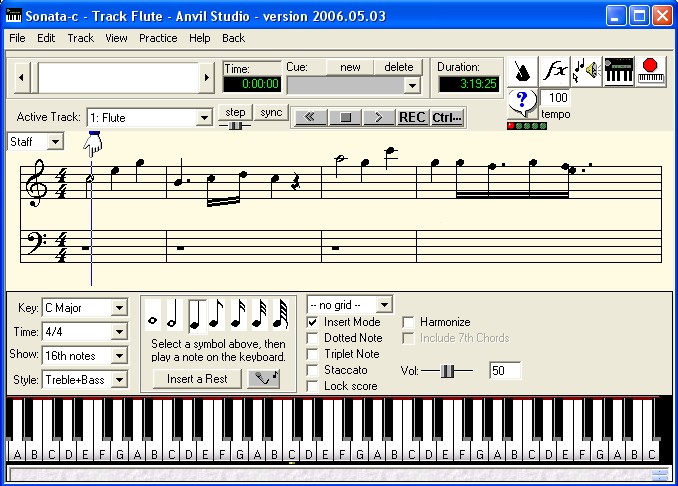
Anvil Studiolla voi luoda uusia MIDI-kappaleita helposti. Joko nuotti kerrallaan tai tallentamalla reaaliajassa soittimen painallukset. Käytössä on koko MIDI-formaatin soitinskaala. Lisäksi on mahdollista käyttää näppäimistöä tai koneeseen liitettävää koskettimistoa nuottien tallentamiseen. Lopullinen ääniraita voidaan koota useista päällekäisistä instrumenteistä. Ohjelmalla voi myös muokata *.mid -tiedostoja.
Lataa ohjelman kotisivulta:  Muutosloki :
Changes in version 2012.10.06:
* Added support the fretboard, TAB editor and Percussion editor when the Copy Me accessory is active, so that when the mouse moves over a note, the correct fret position or drum is highlighted, and when the Step button is pressed or MIDI event occurs, it works with those editors as well.
* Dragging notes from the palette to the staff now works properly when the Triplet, Quintuplet, or Septuplet checkbox is set.
* Improved beam lines.
* When Pro-Mix is installed, and 2 or more MIDI Out ports have the same name, e.g. USB Midi, Anvil Studio remembers which synthesizers were connected to each from one session to then next.
* Several subtle improvements.
Changes in version 2012.10.02:
* Able to load more VST-Instruments including Proteus VX.
* Now runs on systems that don't have .Net 2.0 installed, but do have .Net 4.0 installed.
* Improved ability to select, move, and stretch symbols like slurs, crescendo, etc.
Changes in version 2012.09.02:
* Improved the Staff editor's Chord Builder tool.
* Print-Sheet accessory now allows more header lines.
* Some minor problems were also fixed.
Changes in version 2012.08.08:
* To set the volume/balance for multiple tracks to constant or change them by a percentage, either:
** press and hold the Shift key while clicking on a track's volume control, or
** right-click a track's volume control and select the popup menu item Change Volume for multiple tracks.
Problems fixed in this version:
* View / Track Automation / Reset All: Automation for all tracks in song sometimes did nothing.
* When multiple notes were selected only in the treble or bass clef and the Properties pop-up was selected, it sometimes missed some notes.
* Since version 2012.08.01, rhythm tracks were reverting to Instrument tracks.
Changes in version 2012.08.06:
* Anvil Studio now works well with more VST-Instruments, including the Garritan Aria Player.
* File / Repair Song deletes redundant, unnecessary events.
* File / Save deletes all EndOfTracks except the last one.
Changes in version 2012.08.01:
* Added Chord Builder tool to the staff editor.
* Insert tempo changes at the current song position by clicking the Tempo icon at the top of the screen.
* Made several minor improvements to the staff editor.
Problems fixed in this version:
* File / Export Mixed Audio sometimes generated distortion when set to ASIO mode.
Changes in version 2012.07.01:
* Added checkbox to Key Signature and Custom Time Signature dialogs to allow changes to apply to all tracks.
* Enhanced Track/Merge menu - it includes an option to merge all enabled tracks, and supports filtering out short notes.
* Added a Zoom control to the TAB viewer.
Problems fixed in this version:
* Since version 2012.06.01, the View / Lyrics menu would sometimes not cause lyrics to be visible.
* More VST-Instruments are now supported, including the Korg M1 Le.
* Works well with more VST-Instrument Editors.
* Other minor problems.
Problems fixed in version 2012.06.03:
* Fixed some bugs with editing note properties with the staff editor and shortcuts that affect note properties.
Changes in version 2012.06.02:
* When playing a song that has VST-Instrument tracks and no audio tracks, adjusting the Audio Mix Vol slider while the song is playing no longer causes the song to pause. Adjusting this slider can eliminate VST-Instrument distortion.
* Got around a problem where some VST-Instruments would crash when bringing their editor via the View / Mixer's FX button.
Changes in version 2012.06.01:
* Added View / Options / Staff / Automatically generate tied notes checkbox, which changes staff so that if two notes are displayed in the same measure of the same clef,
e.g. a half note starts at beat 1 and quarter note starts at beat 2, the half note is displayed as 2 tied quarter notes.
* Audio samples can be dragged from Windows Explorer folders to the staff editor and dragged right/left within the staff editor.
* Audio files can also be dragged to Audio editor and piano roll's Edit Samples window.
* Added support for Locrian, Dorian, Phrygian, Lydian, Mixolydian modes to the existing Major and Minor keys.
* With the Pro-Mix accessory, if you right-click Edit Midi Effects and select Pitch Bend, and set the checkbox Reset pitchbend at the end of the note, it now works better.
* When using Note Properties to change the duration for a range of notes, it was shifting following notes.
* Using the Lengthen/Shorten note shortcuts keys now works better when operating on a selection of multiple notes.
* Fixed several other bugs....
Changes in version 2012.05.08:
* When dragging a note from the palette to the staff, a large display now show's the new note's time and note's name as you drag the mouse.
* You can lock the note's pitch by pressing the shift key and then continuing to drag the mouse to select the time.
* If the Ctrl key is pressed while dragging the note, you can insert the new note at locations that overlap with existing notes where the Show: field controls the time-increment steps.
* An example where this is useful would be, if a measure had two half notes, and you wanted to add a quarter note to the last beat of the measure.
* Audio Samples can now be dragged to the Staff from the Audio Samples list below the staff.
P* unch-In now supports MIDI recording the same way it has always supported audio recording.
* Not all VST-Instruments respond to MIDI events for Volume and Left-Right Balance (PanPot) so we added a checkbox named This VST-Instrument responds to MIDI Pan and Vol to the View / Synthesizers screen.
* This is set by default. If you discover that a VST-Instrument does not seem to respond to the View / Mixer screen's Volume or L/R Balance control's, uncheck this checkbox. That will cause Anvil Studio to use those controls to alter the track's Audio volume.
* When using View / Note Properties to change the duration for range of notes, if the checkbox Shift Following Notes is unchecked, the location of the notes will not be changed.
* When changing to ASIO mode, Anvil Studio now first releases the Microsoft GS Wavetable Synthesizer so that it will not prevent the ASIO Driver from accessing the Audio Out device.
* Some improvements were made to how tied notes are displayed on the staff.
* In earlier versions, some songs whose tempo changed over time went silent when played to VST-Instruments.
* A bug was fixed that caused the File / Open and Play menu to report the file was not found when the folder was different from where the previous song had been loaded/saved.
Changes in version 2012.04.09:
* When dragging notes from the palette to the staff, as the mouse is moved left and right, a box at the top of the window tells the time where the note will be inserted.
* The staff displayed when --no grid-- is changed has been improved.
* A more useful message is displayed when an error occurs while using VST-Instruments.
Changes in version 2012.04.08:
* Added splitter bars and scroll bars to Piano Roll editor to make it easier to resize panels and scroll to desired notes within the panel.
* Increased the maximum volume of samples when played back in a song.
* For tracks played by a VST-Instrument, changing the track's Pan/Volume now has an effect even if the VST-Instrument does not respond Pan/Vol MIDI Events.
* MIDI effects parameters can now be edited within a loop with Pro-Mix.
* Added a Lock Score checkbox to the Piano Roll / Rhythm editor.
* Problems fixed in this version:
* When using the Audio editor's Filter / Change Volume, if the selection was made right-to-left instead of left-to-right, it was not altering the correct selection.
Problems fixed in version 2012.04.07:
* This version now supports more VST-Instruments.
* When a track was assigned to a VST-Instrument, composing by playing notes on an external keyboard. was not causing the notes to be echoed by the VST-Instrument.
* File / Print / Score Options would incorrectly report an error in version 2012.03.01.
* File / Save would sometimes warn that two tracks had different time signatures, but would not correctly report what the time signatures were.
* FX button / Properties / Save Presets button would incorrectly report an error.
* In Percussion staff editor, in version 2012.03.01, addint a new drum to the palette would incorrectly report an error.
* File / Repair Song was sometimes removing the wrong redundant pitch bend events.
* Since version 2012.04.02, File/Export Mixed Audio was doing nothing.
* Metronome was sometimes not working properly.
* Added View / Options / Make Anvil Studio my .MID file player.
Changes in version 2012.04.01:
* Improved the Equalizer effect.
* With Pro-Mix accessory installed, VST-Instruments support automation of effect parameters.
* View / Track Automation's Control selector adds new buttons that: Show the next control that has been modified, Reset Automation for: all tracks, current track, a selected effect, a selected parameter of an effect.
* Problems fixed in this version:
* When a VST-Instrument was added by pressing the FX column, it was not echoing entered notes when composing.
* Several other bugs were fixed.
Changes in version 2012.03.01:
* This version does not uninstall the 2011 version, and you can move back and forth between the 2011 and 2012 versions.
* Both versions have compatible file formats. After you feel comfortable with the 2012 version, you can use the Control Panel to uninstall the 2011 version.
* Added Undo/Redo for drawing in automation window.
* Added Duplets and Septuplets to the staff editor.
* Fixed these problems that began occurring in the 2012.01.01 version:
* Playing songs that included audio samples was not working right.
* Playing Playlist files.
* It sometimes could not select the last note on a track.
* File / Print, and changing the number of staffs per page could cause Anvil Studio to incorrectly report that the song had file format errors.
* Other problems fixed in this version:
* VST-Instruments would not echo entered notes after playback.
* Using View / Performer to run a program using an external MIDI keyboard to play sampled sounds was not working properly.
* Using View / Performer with Arpegio tool sometimes failed.
* Latency with CoreAudio sometimes reported Audio Out latency of close to 1 second when it should have been close to 0.
Changes in version 2012.01.06:
In versions since 2012.01.01, File / Export Mixed Audio would sometimes fail when song had no audio tracks and output was not set to stereo.
File / Save provides option to keep time signatures in all tracks consistent.
Problems fixed in version 2012.01.03:
* With some VST-Instruments, it would erroneously complain that it was unable to mix and play fast enough.
* Edits to a loop sometimes did not prompt to save changes before closing the file.
* In versions since 2011.11.01, deleting a track appeared in View / Mixer's track list before a track that had loops could cause loop references to become invalid.
* File / Export Mixed Audio and View / Latency / Analyze / Start sometimes complained that there are no Audio In devices even though none were needed for this operation.
* View / Upgrade Anvil Studio would sometimes report that it was unable to re-launch Anvil Studio because a file was not found.
* Improved the Help / Tutorials menu.
Changes in version 2012.01.01:
* The free version of Anvil Studio now includes access to a single VST-Instrument. This provides a wealth of new sounds and overcomes latency problems with the Microsoft GS Wavetable synthesizer.
* With the Pro-Mix accessory a song can play to several VST-Instruments and MIDI Out ports at the same time.
* The free version supports audio sample rates up to 48,000 samples per second.
* With Multi-Audio 1/8 accessory, it supports sample rates as high as your soundcard supports, up to 192,000 samples per second.
* View / Options / General can now assign Ctrl+V to shortcuts, e.g. Edit / Paste Insert, Edit / Paste Over, Edit / Paste Mix, Edit / Paste Special, etc.
* The menus Edit / Insert Rests into All Tracks and Edit / Delete Selection from All Tracks are now also enabled when editing Audio tracks. * When used, they ask if change is to apply to all Audio and/or all MIDI tracks. It lets you select units from Measures, quarter notes, ... Audio Samples, Milliseconds.
* When the Multi-Audio 8/16 is installed, you can record to MIDI and Audio tracks simultaneously.
* When multiple display monitors are available, Anvil Studio starts up in the same monitor it was in when it last closed. In previous versions, it always started up in the primary display monitor.
* The new version works with more VST-Instruments including DSK_SF2. Works better with 32-bit int ASIO drivers.
* If you have a VST-Instrument or DirectX effect that doesn't work with Anvil Studio,
please let support@AnvilStudio.com know, and we'll address it.
* A problem with the Piano Roll / Rhythm editor's Snap-to-grid control was fixed.
Changes in version 2011.11.10:
* Better Direct X support.
* Improved metronome. Now you can specify Audio clicks or a VST-Instrument to play the metronome clicks. The metronome uses Latency settings to keep in sync with notes being played/recorded.
* Improved File / Print.
Changes in version 2011.11.08:
* Added new options to the CopyMe accessory.
* The per-track Balance control was not working correctly for tracks assigned to VST-Instruments.
* Simplified the options when it displays "The Audio device you have selected for Anvil Studio is different from the default Windows Control Panel device.
Changes in version 2011.11.03:
* You no longer need to choose between the staff editor and having loops within tracks. You can move seamlessly back and forth between the Piano Roll / Rhythm and the Staff editor. From Staff editor, select the menu Track / Loop this track.
From Piano Roll / Rhythm editor, right-click a loop and select Edit this loop with the Staff editor.
* Added 3 more symbols to the end of View / Composer's symbol palette.
* When a song is looping, e.g. because it was started by right-clicking the play button, the staff editor cycles through verses each time the song repeats, which can be useful while learning to sing a new song.
* Made changes so that files saved by Anvil Studio can always be read by Casio's SMF Converter tool.
* Added an octave of additional notes you can select when adjusting guitar tunings via the View / Keyboard & Guitar Properties menu.
* Fixed several bugs.
Changes in version 2011.10.15:
* File / Export Mixed Audio would fail sometimes when song had VST-Instrument tracks.
Changes in version 2011.10.08:
* With Pro-Mix installed, you can now record from more than one MIDI In port at the same time.
When used with the View / Options / MIDI / Record each channel to its own track, you could simultaneously record 64 or more tracks where each one captured the notes from a different MIDI In device. This could be useful in a classroom setting.
* After using the Sync tool to select a MIDI Master clock, Anvil Studio will calculate the tempo for the recorded events and insert Tempo changes.
* Improved View / Synthesizers / Test MIDI Connections.
* Improved the View / Options / MIDI / Master Slave Sync Properties. Now
It lets you select which MIDI In port to use as the MIDI Master clock.
when recording from a MIDI Master, note durations are identical to their duration on the MIDI Master device and tempo events can be recorded.
* Problems fixed in this version:
** View / Options / MIDI / Record No Rests was not working.
** Lyrics were not being printed correctly for some songs with multiple verses and hyphens.
** When exporting mixed audio in a format other than the soundcard's default setting, it could generate an Out of memory error.
** Error 80041206 was sometimes reported.
Changes in version 2011.10.05:
* You can now change the Staff Style property among Treble+Bass, 2 Treble, 2 Bass multiple times per track.
* Edit / Undo menu describes action that will be undone. Same for Redo.
* Added several options to pop-up menu shown when you right-click a track in View / Mixer's track list.
* When right-clicking note(s) in the staff editor, and selecting Move to other track, it defaults to the previous track you selected.
* In previous versions, this moved all notes that occurred at that time, but now if a single notehead is clicked, it is the only note that gets moved.
* When using the staff editor, when selecting a new track, it preserves the time displayed at the left margin, making it easier to compare 2 different tracks.
Changes in version 2011.10.01:
* Shows status in toolbar when data is received from a MIDI IN port, and when data is sent to a MIDI OUT port.
* Improved Edit / Insert MIDI Event / System Exclusive
* Added checkbox Synth is too slow to echo incoming events which replaces the Echo Midi Events to all synthesizers checkbox.
* This is set true by default for high latency (slow) synthesizers such as the Microsoft GS Wavetable Synthesizer, but it can be changed.
* If the active track is assigned to this synthesizer, when recording from an external MIDI keyboard:
** if this is checked, the keyboard will generate its own tones without delay rather then using this slow synthesizer.
** if this is unchecked, the keyboard generates no sound, and Anvil Studio uses the active track's synthesizer, program, and channel to play the notes.
To do this, Anvil Studio sets the external MIDI keyboard's Local Control setting.
When a song is played back, Anvil Studio always uses the Synthesizer assigned to the track to generate sounds. The tracks can be kept in sync in spite of the synthesizer's high latency by using the View / Latency screen.
* Added a new icon at the top of the View / Mixer screen has red arrows that show when a MIDI event has been sent to a MIDI port, or received from a MIDI port within the last half second.
* For the View / Synthesizers screen included with the Pro-Mix accessory:
** Added button Assign all tracks to this synth, which when pressed, assigns all tracks in the current song to be played on the selected synthesizer.
** Added button Set Default Synth, Bank..., which allows you to select the synthesizer, MIDI bank, and MIDI program to use when creating new tracks.
* For synthesizers that support them, added the ability to refer to 128 different drums in the Rhythm editor rather than the set of 47 General MIDI drums.
* It no longer asks you to decide where to save an untitled song file immediately after recording an audio track, or when selecting the File / Export Mixed Audio menu. You can now leave the song Untitled until you exit, select File / New, or load another file, at which time you will be prompted to save it.
* Problems fixed in this version:
** It was leaving around files named UntiXXX.wav which it now cleans up.
** Sending System Exclusive messages to external synthesizers sometimes failed.
** Playing starting to play a long, starting in the middle, where the song had with lots of notes, Anvil Studio would sometimes incorrectly report unable to play this song in perfect sync when the song finished, even though it did play it in perfect sync.
** File / Repair Song sometimes reported non-errors.
** When loading a song file with audio tracks, it would sometimes incorrectly report that an audio track's file was in use by another program.
** Quite a few minor problems.
Problems fixed in version 2011.09.03:
* When Sustain Off occurred at the same time as Sustain On, the Sustain Off event was getting filtered out, leading to way too much sustain.
* In version 2011.09.01, a bug was introduced that frequently caused it to ignore attempts to change a track's instrument.
Problems fixed in version 2011.09.01:
* You can now tie triplet or quintuplet notes.
* When recording a MIDI track, recording began at time 0 rather than the current song position.
* When editing an unquantized recorded track, selecting rests and deleting them sometimes deleted an adjoining note.
Changes in version 2011.08.07:
* Improved Piano Roll / Rhythm editor scrolling.
* When you click an instrument in the instrument selection window, a brief sample of the sound is played so you don't need to click OK just to find it is not the instrument you wanted. This can be turned off with a checkbox in the same window.
* The Edit / Redo menu item was added.
* Problems fixed in this version:
* Adjusting the volume of a selection of notes, the volume of the first next note (outside of the selection) was also changed.
when deleting a selection of notes, the first next chord label (outside of the selection) was getting deleted as well.
* When going back from a note after measures of rests, it sometimes ignores the rests and goes directly to the previous note.
* Times were displayed and parsed as Measures:QuarterNotes:Ticks, and now they are displayed and parsed as Measures:Beats:Ticks.
* When using the Left Arrow key at the left margin, it sometimes skipped over one or more measures of rests, going directly to the previous note.
* Ctrl+Right Arrow would sometimes not cause scrolling past the right margin.
Changes in version 2011.08.05:
* When the mouse hovers over volume and balance controls, their current values are displayed.
* When mouse hovers over a note, note info is displayed as a popup.
* The track column resizing control now only appears when the mouse is over the top row.
* The menu File / Repair Song now works well on files that have rhythm / Piano Roll tracks that have loops.
* Problems fixed in this version:
** The text displayed to the left of the volume and balance controls while they are being adjusted sometimes disappeared.
** Open and Play, after changing folders, sometimes reported File cannot be found.
** File / Print / Conductor's Score / Track list was partially blocked.
** When using Core Audio, adjusting master volume while a song was playing sometimes caused the song to pause.
** The menu Track / Insert Chord Labels was sometimes ignoring the checkbox "Name labels as if track was in the key of C Major"
** The menu Edit / Set Record+Play Start+End times was sometimes ignored when recording.
** Problems with the Music Drills / Exercises accessory's menu Practice / Scales / Key Signatures, and Practice / Timing / Drill.
** A measure that contains a Time / Key signature can now be combined with Begin / End Repeat, Double Bar, and Double End Bar notation.
** PacketTooLarge error sometimes occurred when using ASIO with some soundcards.
Problems fixed in version 2011.07.09:
* Fixed some MIDI and Audio sync problems.
* It was not responding to changes in View / Options / Audio / #output buffers.
* Since version 2011.06.10, a bug caused device latency settings to be ignored.
* Added button to remove a VST from the list of frequently-used VSTs.
Problems fixed in version 2011.07.04:
* With some VST-Instruments, only the first few bars could be heard.
* View / Options / MIDI / shortcuts could not be set.
* With Percussion tracks, sometimes a very low note would be displayed as a tie.
* Fixed several places that reported You have uncovered a bug in Anvil Studio"
Changes in version 2011.07.01:
* Note Properties' Move notes to other clef checkbox is now enabled when more than one note selected.
* Added View / Option / Staff checkbox In grid mode, click on staff to insert note. When not checked, clicking just repositions the insertion point.
* By placing the cursor at the end of the current song before selecting File / Merge, it gives the option to merge all tracks of the new song so they begin playing after the currently-loaded song ends.
* Added a checkbox to ASIO Properties Twice as many mono ASIO input devices. When not checked, ASIO inputs are treated as half as many stereo devices.
* When editing the percussion staff, the Add new instrument to palette button has more options.
* Problems fixed in this version:
** The Add new instrument to palette button was always setting the drum to High Bongo.
** Right-arrow at right margin with zoom=2 was not advancing the staff cursor.
** Begin Repeat symbol was misplaced when combined with a NewLine symbol.
** Corrected some audio problems that caused it to generate the message You have encountered an error.
** Print Sheet accessory would sometimes could allow the 1st line left / right headers to be set to blank.
Changes in version 2011.06.15:
* Dragging a note on staff highlights the drum, piano note, or guitar string & fret.
* View / Options has a new checkbox to check for and optioanlly install new versions of Anvil Studio and its accessories every time Anvil Studio starts up.
* Versions 2011.06.10->12 were reporting an error during File / Exit based on a localization bug that only occurred in a few countries.
Changes in version 2011.06.09:
* Track / Add Chord Labels now lets you indicate that chords should be named as if they were in the key of C-Major, even if they are in another key.
* In Windows Vista or Windows 7, you can now [un]plug a USB sound adapter and Anvil Studio will react gracefully.
* If a track has more than one Program Change MIDI event, the correct program will now be displayed in the track list based on the song's position.
* With the Pro-Mix accessory, clicking on the Device or Instrument column, and then the Synthesizer list, a new entry add new synthesizer lets you add a VST-Instrument or MIDI synthesizer without selecting View / Synthesizers.
* Edit / Insert Notation / Repeat / ... can now be added to the same measure that has an Up Beat symbol.
* When window is resized while the Piano Roll or Loop Editor is active, Anvil Studio now does a better job of reallocating screen space to various functions.
* Problems fixed in this version:
** If a VST-Effect and VST-Instrument had the same name, e.g. Kore Player, Anvil Studio could only load one or the other. Now it can add both to the same song.
** Keyboard sometimes flickered.
** Beginning with version 2011.05.05, editing a tempo map had sluggish response, but no longer does.
** Loading songs with multiple MIDI channels in the same track could sometimes become very slow, to the point where the computer appeared to be hung. It is now nearly instantaneous.
Problems fixed in version 2011.06.03:
* The menu View / Edit lyrics in window with no notes now works with Karaoke files.
* The menu Practice / Ear Training / Voice was not working correctly.
* The menu Track / Split Track into multiple .WAV files was not working correctly.
* Fixed a problem with menu Edit / Paste to all Tracks.
Changes in version 2011.06.02:
* Improved screen layout
* Added menus Edit / Copy from all Tracks and Paste to all Tracks to Piano Roll and Rhythm editors. They were already in the Staff editor.
* When printing single-clef tracks with several lines of lyrics, the bottom lines of lyrics were not always visible.
* It is now possible to Edit / Insert Notation / New Line and
Edit / Insert Notation / Repeat / ... on the same measure.
* Practice Notes sometimes incorrectly reported errors
* Added new drag & drop icon for Prima Volta combined with Seconda Volta.
* Added menu items View / Ring Tone (SP-MIDI), and
* View / Active Track's Highest Polyphonic Demands
to make it easier to generate mobile phone MIDI ring tones.
Changes in version 2011.05.09:
* Added menu item Edit / Stretch or Compress time which lets you select a range of notes and stretch/compress by an absolute or fraction amount. For example, select 3 quarter notes and change them to a set of 3 triplets.
* Made more improvements in the layout of beamed notes.
* Made improvements to the Note Properties window.
* Minor key signatures were getting drawn twice.
Changes in version 2011.05.08:
* Added trusted certificate authority signed code to protect the code from modification, and so browsers won't complain about downloading from an unknown source.
* Problems fixed in this version:
** Some spacing/layout problems with printing sheet music.
** A limited number of MIDI-0 files got loaded with 2 channels on one track.
** Beamed 16th notes were sometimes displayed as 8th notes.
** The menu Track / Align notes with measures sometimes did nothing.
Changes in version 2011.05.05:
* The Edit / Insert MIDI Event menu has been enhanced and all features of it are available in the free version.
* File / Print Problems fixed in this version:
* Per-track and per-file settings are saved consistently so they default to the values used the last time the track / song was printed.
* Sometimes when End-Repeat notation occurred at the end of a line, it was slightly off.
* Beamed notes take less horizontal space and the angle of beam lines is never large.
* Other Problems been fixed in this version:
** It was sometimes thinking that a VST was really a VST-Instrument.
Changes in version 2011.03.03:
* With the Multi-Audio 1/8 or 8/16 and a compatible soundcard, you can now record 24-bit at rates up to 192,000 samples per second.
* Updated some help files and fixed some bugs.
Changes in version 2011.03.01:
* Simplified View / Mixer and View / Options screens.
* View / Options now lets you specify a template file, which will be used when File / New is selected.
* For example, every time File / New is selected, the new song can have 4 audio tracks, each already associated with a different audio source.
* It now detects your computer's Locale and selects an appropriate font for lyrics, including East Asian fonts.
* Bugs that have been fixed in this version:
* In some situations the program stopped working when outputting to MIDI Out ports.
* In some situations it was not showing the cursor advancing while recording audio tracks.
Changes in version 2011.02.12:
# Bugs that have been fixed in this version:
# In some configurations, it was unable to change which MIDI In port was used.
# Lengthening a note that was immediately followed by the same note said it was not possible, while now it shifts the following notes if Insert Mode is enabled.
# It was not drawing ties at the left or right margin in the staff editor.
# Screen layout was overcrowded when Control Panel / Display / Settings / Advanced / Large size (120 DPI) was set.
# With Multi-View, when using Scrollable range of tracks, the scroll bar was not responding properly.
# Sometimes, typing the space key in a lyric or comment field would start the song playing.
# Measures were not lining up properly in Multi-View or Print-Sheet conductor's score.
# Some songs were causing Anvil Studio to inappropriately display this message "Computer is not fast enough to play this song".
Changes in version 2011.02.02:
# Added a button Edit MIDI Routing for this song to the Pro-Mix accessory's View / Synthesizer page. This lets you add any number of routing commands that cause MIDI events received from any MIDI In port to get routed to any MIDI Out port or VST-Instrument port. This can be useful during either a recording session or live performance.
# Added a menu item File / Open and Play which displays all of the song files contained in a given folder, which can be opened and played with a single mouse click.
# Added information to the Help / Tutorials menu that describes how to Use Anvil Studio's Pro-Mix accessory to control synthesizers during a live performance.
# Several Staff editing and display bugs were fixed.
Changes in version 2011.01.15:
# Added the ability to modify the tempo of songs by a percentage rather than changing them to constant tempo.
# Automatically repairs more kinds of damaged .MID files.
# Fixed problems:
# Cue points are now always listed in the order that they appear in the song.
# Sometimes, starting 2 instances of Anvil Studio and copying & pasting between them would fail.
# Print / Preview / Copy to Clipboard would sometimes result in stems that were too thin to see clearly.
# Fixed some Unicode problems so that now it runs in all locales.
# Sometimes, when closing a prompting window, there was screen flickering.
# Sometimes, when a track was assigned to a VSTi, that track would play at the wrong tempo if started mid-song.
# Several other bugs have been fixed.
Changes in version 2011.01.07:
# View / Tablature would sometimes display a blank grid.
# When changing the tempo, it would sometimes warn that tempo was not constant when it was constant.
# It would sometimes erroneously report "Error getting SFMAN Function Table"
Changes in version 2011.01.04:
# Added Track / Properties... menu and checkboxes to disable display of Triplets and Quintuplets.
# Added Split into two notes popup menu in the Staff editor.
# Fixed problems related to:
# Setting Time / Key signatures.
# View / Composer / Lyrics Font button.
# Display measure number accurately in tracks with multiple time signatures.
# Position of dot that follows notes with stems up.
# File / Export Mixed Audio.
New features in version 2011.01.01:
# View / Composer
# Finer control over size of text and notes on screen.
# Added zoom control to change the size of the staff editing area.
# After changing the field that says --no grid-- to 16th notes, or the smallest note you will be working with, you can click anywhere on the staff to insert a new note of the current note length.
# Lyrics, track names, and comments can now be in Chinese, Japanese, Korean and other languages.
# Added View / Note Properties to make it easier to select one or more notes and view or change their properties.
# Select a range of notes and adjust the Volume slider to change the vol of selected notes.
# Select range of notes, Stacatto, Louder, Softer, ...
# Drag and drop notation like grace notes, trills, repeats, caesura from a palette to the staff.
# Added Copy / Paste / Undo to pop-up menus.
# Percussion editor employs standard percussion notation
# Select the menu Track / Create / Rhythm Track (Staff editor), or
in the Composer window, change the track's Style property from Treble + Bass to Percussion.
# Right-click on the drum palette to define the symbol and MIDI note for a new percussion instrument.
# File / Print
# Better print preview
# More control over staffs per page, zoom, measures per bar, size of staffs and notes.
# More options when printing a Conductor's score.
# Effects
# When Pro-Mix accessory is installed, Anvil Studio can now act as a Rewire master.
# Native effects editors are no longer modal - they can remain open and dynamically edited while the song is playing.
# When the Pro-Mix accessory is installed, native effects work with Automation, the same way VST effects have in previous versions, allowing you to record non-destructive effects modifications while the song is playing.
# Effects can be disabled with a checkbox, but they still retain their properties.
# Added a check box to the View / Option / MIDI screen so a track can have multiple Program Change events.
# To copy and paste between 2 song files, start two copies of Anvil Studio with different songs loaded, and copy and paste between them.
# View / Performer - Sound Module tool can map keys to sampled sounds
# Added a Font button to View / Options so you can change Anvil Studio's font.
# Added tutorials for
# aligning notes with beats and measures,
# stretching / compressing notes over time,
# using Anvil Studio with VST-Instruments,
# compensation for MIDI and Audio device latency and working with low-latency ASIO and Virtual Instruments.
# using Anvil Studio with ReWire-compatible applications.
Problems fixed in version 2009.11.08:
# When Multi-Audio 8/16 was installed and playing a song with 24 bit, 192kHz stereo audio distortion can be heard on slower systems. This can be fixed by selecting the menu View / Options / Audio and changing the Bytes per buffer field to 8000 or 12000.
# Systems without MIDI Manager installed were unable to load SoundFont files after selecting the menu View / Synthesizers.
New features in version 2009.11.01:
# Enhanced the menu Track / Add Chord Labels...
# Problems fixed:
# Under certain conditions, when starting to record an audio track, it could crash.
New features in version 2009.10.01:
# Piano Roll and Rhythm editor now have note popup menus to join a note with the next or previous note.
# Several minor bugs were fixed.
Problems fixed in version 2009.06.06:
# Lyrics were not being displayed properly when the menu Track / Play track with a Swing rhythm was checked.
# When set to ASIO mode, it would sometimes report an error File Not Opened 80041010
# Lyrics were not being displayed properly when the menu Track / Play track with a Swing rhythm was checked.
# It sometimes did not print pages correctly when Time Signature was set to and the menu Edit / Insert Notation / New Line was used.
# It was sometimes erroneously reporting "This operation requires the track to have a Patchlib (synth)"
# The AllNotesOff event is now only sent when a song completes normally, but not when the song is paused. This can be overridden by setting the View / Options / Midi option "Stop button sends AllNotesOff event".
New features in version 2009.05.06:
# When the MIDI Manager accessory is installed, you can add a VST-Instrument via View Synthesizers / Add Synthesizer / Load VSTi.
# VST-Instruments added with View / Synthesizers get their properties saved and restored the next time Anvil Studio starts.
# VST-Instruments generate sound in Compose mode, no longer just when playing a song.
# A buffer-size problem caused some VSTs to crash during playback in some situations.
# Overflow errors could occur with some VSTs when their property editor was visible.
# Added the menu item Edit / Insert Notation / Caesura.
# Problems fixed:
# Overflow error could occur if song is loaded with Ticks per Quarter Note set to 9600 or higher.
# ExportMixedAudio, when using ASIO drivers, sometimes failed to generate ouptut .WAV file.
# MIDI Macros weren't working when View / Mixer was active and Echo To All Synthesizers was not set, because the MIDI In port was not turned on.
# If a shorter track was tied to a VSTi and a longer track tied to a non-VSTi, the song would stop playing when the VSTi track finished.
New features in version 2008.09.04:
# Changed note stems to conform to the Standard Music Notation Practice guidelines published by the Music Publishers Association. If this causes problems with layout of existing scores, it can be undone with View / Options / Staff / Draw stems compatible with 2007 version.
# When the mouse moves over the keyboard or fretboard, it now gives visual feedback for the note's location on the staff.
# The default note volume can be changed from an external MIDI keyboard by holding the Shift key while pressing a MIDI note.
# Added Piano Roll / Rhythm editor popup menu items to play a loop once and play it repeatedly for testing. You can also edit the loop while it is being played.
# Problems fixed:
# Version 2008.09.03 displayed whole notes wrong.
# A bug in the past few releases prevented DirectX effects from being loaded.
Problems fixed in version 2008.05.01:
# It sometimes said "Your computer is not fast enough to play this song" by mistake.
# Added several warning and hint messages.
New features in version 2008.04.01:
# With Pro-Mix accessory, you can now use Automation to dynamically adjust the tempo of the song with realtime feedback.
# When printing guitar tabs, it would sometimes print beyond the right margin.
# There were circumstances when it would not allow Anvil Studio to be installed on any drive other than the C: drive.
# MIDI Master/Slave synchronization has been improved - more reliable and flexible.
# Fixed a problem which caused a crash with some configurations when selecting Export Mixed Audio from the File menu while certain VST-Instruments were loaded.
# Several other miscellaneous mistakes have been fixed.
|
Lisää -><- Piilota |


 MiikaH:n Sivut a.k.a. MiikaHweb | 2003-2021